Help shoppers find the right home decor and furniture products faster

Lumiz helps ecommerce merchants turn room photos into relevant product recommendations. Start with product images, reduce search friction, and add 3D or AR where it actually improves purchase confidence.

Less search, more sales

Turn room photos into product recommendations

Many shoppers do not struggle because a store has too few products. They struggle because there are too many options and too little confidence about which product actually fits their space. Traditional recommendation systems often depend on large amounts of behavioral data, complex setup, or long training periods. Lumiz takes a simpler approach: shoppers upload a room photo, choose a category, and immediately see products that better match the style, color, and context of their space.

Talk to us about your catalog

If you sell products where room fit, style, or visual confidence matter, we can help you evaluate whether Lumiz fits your storefront and category.

Embed demo

See how a visual recommendation embed works on a storefront

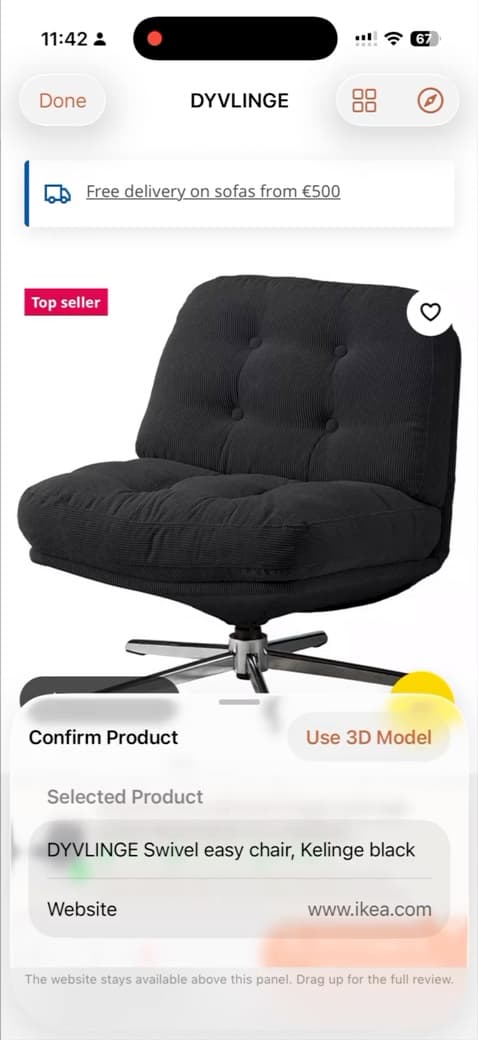
This demo shows how shoppers can upload a room photo, receive relevant product suggestions, and continue to the product page.

Loading demo…

Add models to this catalog to generate the embed preview.

How it works

Launch visual product recommendations without building it yourself

Import the products you already have into Lumiz, define categories, and create catalogs for your storefront. Then embed the recommendation flow on your website. Add 3D or AR later only for products where richer preview clearly adds value.

Merchant setup

  1. Create a catalog in the LUMIZ dashboard

Start with your existing products, publish the embed once, and expand into 3D or AR only where it makes sense.

Shopper journey

Shopper

Upload room photo

Upload room photo

A short flow that reduces choice overload: upload a room photo, select a category, get top picks, then explore the best options in more detail.

Why merchants use Lumiz

Most shoppers do not struggle because there are too few products. They struggle because it is hard to find the right one with confidence. Lumiz improves product discovery first, then adds richer product validation where it matters.

Reduce search friction

Help shoppers move from too many items to scroll through to a shortlist that better fits their room, style, and category.

Reduce search friction

Start with the catalog you already have

Launch with existing product images and catalog data. You do not need 3D for every SKU to improve discovery in visual-fit categories.

Start with the catalog you already have

Add richer validation where it matters

Use 3D or AR for hero products and high-consideration categories when scale, silhouette, or placement affect the buying decision.

Add richer validation where it matters

MFor Merchants

  • Use product images first and add 3D selectively.
  • Give shoppers a faster path to relevant products.
  • Reduce discovery friction in large or style-driven catalogs.
  • Measure outcomes like click-through and add-to-cart from discovery.

CFor Customers

  • Upload a room photo instead of guessing keywords.
  • See a smaller set of products that better fit the space.
  • Open product pages with more confidence.
  • Use 3D or AR previews when they help validate the choice.

Get Lumiz updates

Occasional product and Augmented Commerce updates. Confirm your email to join the list.

FAQ

Answers for merchants evaluating LUMIZ

Practical answers for ecommerce merchants evaluating visual product recommendations, room-photo discovery, and optional 3D or AR product previews.

QWhat is Lumiz?

Lumiz is an augmented commerce tool for ecommerce merchants. It helps shoppers upload a room photo, discover relevant products faster, and view selected items in 3D or AR when that improves the buying decision.

QWho is LUMIZ built for?

Lumiz is built for small to medium ecommerce merchants, especially brands in furniture, home decor, rugs, lighting, wall art, mirrors, and other categories where style and visual fit matter to conversion.

QHow do room-photo product recommendations work?

A shopper uploads a room photo, chooses a relevant product category, and receives product recommendations matched to the visual context of the room. The goal is to reduce choice overload and help the shopper reach relevant product pages faster.

QCan I start with product images instead of 3D models?

Yes. For many merchants, starting with product images is the best path. Lumiz supports 2D product catalogs, so you can launch visual product discovery without waiting for full 3D coverage.

QDo I need 3D models to get started?

No. 3D models are optional. They can improve purchase confidence for categories like furniture and larger decor items, but many merchants should start with 2D first and add 3D or AR only where it clearly helps conversion.

QWhat is the difference between 2D and 3D catalogs in Lumiz?

2D catalogs use standard product images to power visual recommendations and product discovery. 3D catalogs add richer product viewing, including 3D and AR preview where supported. Lumiz supports both, but 2D is often the faster and more practical starting point.

QDoes Lumiz work with Shopify?

Yes. Shopify is one of the main platform fits for Lumiz. Merchants can use Lumiz to create a visual recommendation experience and connect shoppers from that experience back to Shopify product pages.

QDoes it work with Shopify, Wix, Webflow, and WordPress?

Yes. Lumiz is designed to be embedded into existing storefronts with an HTML snippet or direct-link flow, which makes it suitable for common ecommerce platforms and website builders.

QDo I need a developer to get started?

Not necessarily. Lumiz is intended for small and medium merchants that do not want to build custom recommendation or AR infrastructure. The goal is to make launch and embedding simple enough for lean teams.

QWhat kinds of products work best with Lumiz?

Lumiz works best for products where visual fit influences the purchase decision. Strong examples include furniture, home decor, rugs, lighting, wall art, mirrors, shelving, and other products that shoppers want to evaluate in the context of a room.

QCan Lumiz help reduce returns?

Lumiz is designed to improve purchase confidence before checkout by helping shoppers find more relevant products and validate their choices more clearly. That is especially useful in categories where returns are driven by style mismatch, scale uncertainty, or poor product fit.

QCan Lumiz help improve ecommerce conversion?

That is the goal. Lumiz helps merchants reduce product search friction, narrow large catalogs into more relevant choices, and guide shoppers toward products they are more likely to buy with confidence.

QDo shoppers really upload room photos?

They can when the value exchange is clear. If the shopper understands that uploading a room photo leads to faster, more relevant product suggestions, the flow becomes much easier to justify than asking them to browse a large catalog alone.

QHow hard is it to launch Lumiz for a small ecommerce team?

The practical approach is to start with one category, a curated set of products, and a simple embedded flow. Small merchants do not need to launch across their entire catalog on day one to get value from visual product recommendations.

QHow do recommendations work technically?

Lumiz uses computer-vision-based matching to connect a shopper’s room context with products in the merchant catalog. The system is built around image-first recommendation logic, with richer 3D and AR viewing available where the merchant has the right assets.

Private access

Start with one category and test the workflow

Create a catalog, add products, and publish a room-photo recommendation flow for the categories where visual fit matters most. Start with product images first, then expand into 3D or AR where it makes sense.