See it in
your room.
Before you
bring it home.
Found furniture online? Turn a product photo into a 3D model and try it in your own space.
Free to download · iOS 18+ · Optional in-app purchases
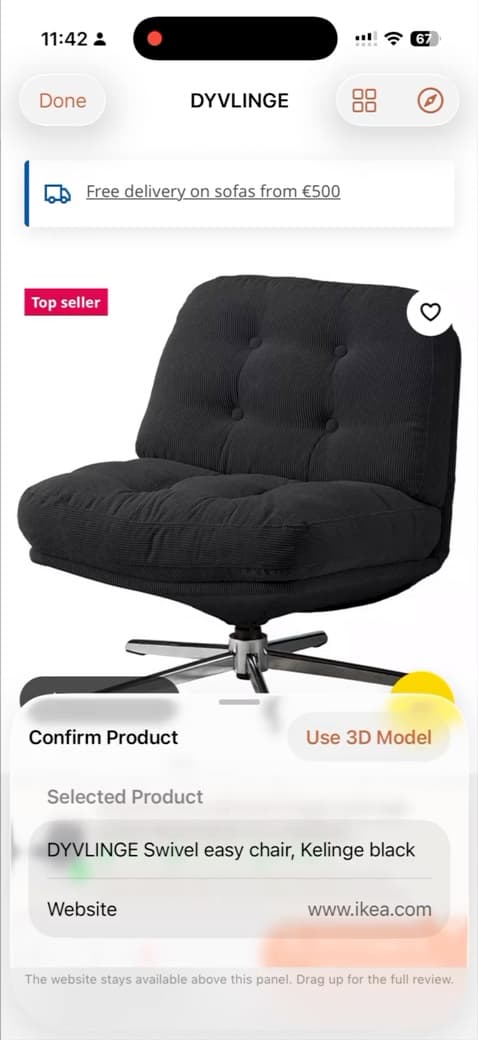
From product page
to your room.
Your next idea.
Already feels at home.
Try Lumiz on your iPhone. Scan your room, bring in a piece you love, and see how it all comes together.
iOS 18 or later. Free to download.
Optional purchases. No subscription.
A few things
worth knowing.
Before you start imagining.
What does Lumiz help me do?
Lumiz helps you scan a room, turn a product image into a 3D planning object using dimensions you confirm, then check its scale and placement in the space. You can save the layout and view it in AR.
Which phones can use Lumiz?
Lumiz is available for supported iPhones running iOS 18 or later. Automatic room scanning uses LiDAR on compatible iPhone Pro models. Other supported iPhones can measure rooms manually. Lumiz is currently available on iOS only; there is no Android app.
Is Lumiz free to download?
Yes. Base includes up to 2 saved rooms and 5 My Items. Sign in with Apple for cloud sync and 10 lifetime AI generations. Optional Lumiz Plus is a one-time purchase with higher limits and support for importing your own 3D files. Plus users can buy additional generation packs. There is no subscription.
Will Lumiz tell me whether an item will fit perfectly?
Lumiz is designed to help you visualise in context and check scale and placement. It uses the dimensions you enter, so it should complement—not replace—your own measurements and product details.
Can I add products from any shop?
You can bring in a product image you found online for planning. Lumiz does not currently offer retailer partnerships or purchasing integration.
A little inspiration, occasionally.
Get new features, room-planning ideas, and Lumiz product updates.